
Model Context Protocol (MCP) finally gives AI models a way to access the business data needed to make them really useful at work. CData MCP Servers have the depth and performance to make sure AI has access to all of the answers.
Try them now for free →


Talk to Your Outreach.io Data. Trust the Answers.
CData MCP Server for Outreach.io connects natural language interfaces to your Outreach.io data — securely, intelligently, and without compromise.
No complex pipelines. No new UIs. Just real answers, built on the enterprise infrastructure you already trust.
download beta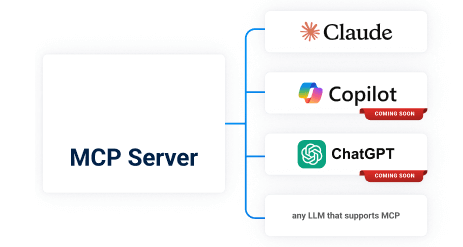

Using Outreach.io MCP Server for Analytics & Reporting
You have the data. It's accurate. It's valuable. But asking a simple question like "What's driving churn in Q2?" — still takes dashboards, analysts, and days. MCP changes that.
Natural Language Querying for Real Enterprise Data
Query Outreach.io Naturally. Answer Precisely.
Let executives, PMs, and analysts use natural language to query live Outreach.io data — without needing SQL, BI tools, or training.
Those questions you've avoided asking because the answer would require yet another reporting request? Ask them, and let AI help you explore your Outreach.io data.
Ask Questions that Combine Data Across Sources
Combine Outreach.io data with data from other databases, data warehouses or other cloud apps — no pipelines required. Users can simultaneously load multiple MCP servers to blend data across multiple source systems, and produce the quantitative, descriptive, or historical analysis you need.
Secure Data Controls
MCP uses your existing authentication and your data access controls. No exposure, no shadow data, no exceptions. Users authenticate with their own credentials using the source's most trusted form of authentication to connect to the AI client. This ensures AI access respects the security and permissions your organization has already put in place.
Built for Performance at Scale
With query pushdown, parallel execution, and bulk operations, the Outreach.io MCP server delivers fast answers from even the largest orgs. Less time spent watching AI flash 'generating a response' equals faster analysis, deeper understanding, and overall better results.
Which reps are falling behind this quarter?
I'll help you analyze the your Outreach.io data to answer this question. First, let me query Outreach.io structure and data to understand what we're working with.
View result from Outreach.ioMCP_run_query from Outreach.ioMCP (local)
...
View result from Outreach.ioMCP_run_query from Outreach.ioMCP (local)
...
The Outreach.io MCP Advantage
If your company uses Outreach.io and your team needs better, faster answers — this is your next step.
- Connect your AI client (Claude, Copilot, ChatGPT) in minutes
- Query Outreach.io securely using natural language
- Expand to other data sources when you're ready
Use Cases for Outreach.io MCP Server
MCP doesn't replace your data tools. It turns them into something everyone can use.
- Your leadership asks better questions.
- Your teams get faster insights.
- Your org gets compound leverage.
That's what great software should do!
Stakeholder
Ask in English
MCP Does
Sales VP
Which reps are falling behind this quarter?
Queries Salesforce, applies permission filters, returns ranked output
Product Manager
How many enterprise customers churned after 3 support tickets?
Joins CRM and support data via connectors
CPO
Show me product usage by plan for Q2 renewals.
Cross-system, governed query delivered in seconds
CMO
Which campaigns drove the most qualified leads last month?
Joins ad performance with lead quality metrics from CRM or marketing automation systems.
Operations Analyst
Which records in our partner system API haven’t been updated in over 90 days?
Pulls data from an external system via API, compares timestamps, and returns stale entries.
Data Engineer
What is the query volume by schema over the last 7 days?
Queries usage logs or other data to track query counts and load by schema.
Head of Analytics
Which campaigns generated the highest ROI last quarter?
Joins campaign spend, attribution, and revenue data; returns ranked performance by campaign and channel.
Working with the Outreach.io MCP Server
Getting started with the Outreach.io MCP Server in four simple steps:

Download the Outreach.io MCP Server, open the installer and follow the prompt instructions.

Configure your MCP Server by securely authenticating with the source system.

Open Claude Desktop, confirm the Server's tools are visible. Begin asking questions and getting answers.


Want to stay in the know?
Sign up for our limited series covering useful prompts, tips, and future CData MCP Server release that will make Claude your undisputed work bestie.
Your future self will thank you.
Ready to get started? Try the Outreach.io MCP Server today!
Turn questions into answers — with the infrastructure you already trust.
