
Model Context Protocol (MCP) finally gives AI models a way to access the business data needed to make them really useful at work. CData MCP Servers have the depth and performance to make sure AI has access to all of the answers.
Try them now for free →


Comparing Insert Methods in BigQuery: Streaming, DML, and Bulk Loading with the CData BigQuery Driver
Google BigQuery is a cloud data warehouse designed to store and analyze massive volumes of data with high performance and scalability. The CData BigQuery Driver offers multiple efficient insert methods — Streaming, DML, and Bulk Loading — to load data into BigQuery based on your integration needs.
This article compares the performance, cost, and update timing of these three methods to help you choose the best approach for your data workflows.
Let's begin.
About Each Insert Method
Streaming Inserts
Streaming inserts send individual rows to BigQuery in real time, with data becoming queryable within seconds. Ideal for real-time analytics, live dashboards, and IoT telemetry.
Streaming offers near-instant data availability but comes with higher costs. DML operations (UPDATE, DELETE) are restricted for up to 30 minutes after insertion.
Pros: Instant access. Great for real-time analytics.
Cons: Higher costs. Temporary update restrictions.
Use streaming when the latest data must be available immediately.
Streaming uses the tabledata.insertAll method. Checkout the docs here: https://cloud.google.com/bigquery/docs/reference/rest/v2/tabledata/insertAll
DML
DML (Data Manipulation Language) lets you insert, update, or delete records with SQL in BigQuery. It offers transactional integrity—records are fully inserted or not inserted at all.
DML is ideal for small-scale updates where correctness matters. Data becomes available immediately, but performance is slower and costs are higher for large datasets.
Pros: Immediate availability. Atomic operations. SQL-based flexibility.
Cons: Slower and costlier at scale. Slot consumption.
Use DML for small, critical updates that require strict data consistency.
Learn more about DML here: https://cloud.google.com/bigquery/docs/reference/standard-sql/data-manipulation-language
Bulk Loading
Bulk loading ingests large datasets into BigQuery from Cloud Storage or other sources, supporting formats like CSV, JSON, Avro, and Parquet.
It is highly cost-efficient and optimized for batch operations, but data is queryable only after the load job completes.
Best suited for periodic ETL jobs, historical imports, or migrating large datasets where real-time access isn't required.
Pros: Very cost-effective. Scales to large data volumes.
Cons: Delayed availability. Requires staging files first.
Learn more about bulk loading here: https://cloud.google.com/bigquery/docs/batch-loading-data
Insert Method Comparison
Here's a comparison of BigQuery insert methods. A lower rating doesn't mean the method is unsuitable — it simply reflects how it performs relative to other methods. Actual performance and costs depend on the specific use case.
| Insert Method | Performance | Time to Update | Cost | Accuracy |
|---|---|---|---|---|
| Streaming | Very Good | Poor | Poor | Neutral |
| DML | Poor | Very Good | Neutral | Excellent |
| Bulk Loading | Neutral | Neutral | Excellent | Neutral |
Notes:
- Streaming Inserts: Best when real-time data availability is critical. High performance but higher costs and some update restrictions.
- DML: Best for small, critical updates with full transactional integrity. Immediate availability but less efficient for large-scale loads.
- Bulk Loading: Most cost-efficient and suited for large data transfers. Some delay before data becomes queryable.
Inserting Methods with BigQuery CData Drivers
CData delivers powerful BigQuery Drivers for JDBC, ODBC, ADO.NET, and Excel, enabling seamless connectivity to Google BigQuery. Easily integrate live BigQuery data to and from your BI, analytics, ETL workflows, and custom applications.
Let's use the CData JDBC Driver to insert data into BigQuery using the Streaming, DML, and Bulk Load methods.
Download the driver from here and follow along.
Specifying the Insert Method in the JDBC Driver
The CData BigQuery Driver lets you control how data is inserted using the InsertStrategy connection string property. You can choose between:
| Insert Method | Parameter |
|---|---|
| Streaming Insert | streaming |
| DML Insert | dml |
| Bulk Laoding | batch |
By default, the driver uses streaming inserts with InsertStrategy=streaming. To switch methods, simply add the InsertStrategy option to your connection string, like:
jdbc:googlebigquery:InitiateOAuth=GETANDREFRESH;DatasetId=demo;ProjectID=test; InsertStrategy=dml
For Streaming Inserts
Connect with InsertStrategy=streaming in the connection string and run the following SQL query:
INSERT INTO [account-wk] (Id, Name) VALUES
(10, 'StreamingTest1'),
(20, 'StreamingTest2'),
(30, 'StreamingTest3');
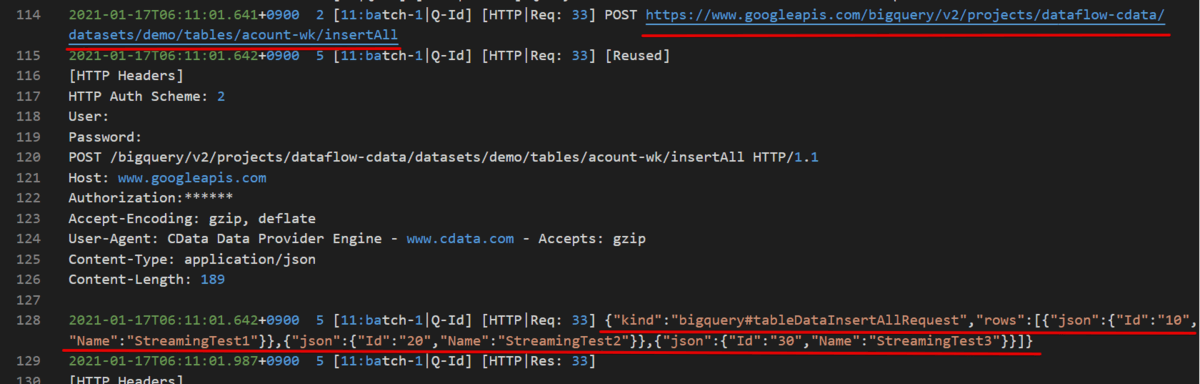
You can see that the driver invokes the insertAll API method, sending records as JSON in the request body.
For DML Inserts
Connect with InsertStrategy=dml and execute the same insert as Streaming with different records:
INSERT INTO [account-wk] (Id, Name) VALUES
    (10, 'DMLTest1'),
    (20, 'DMLTest2'),
    (30, 'DMLTest3');
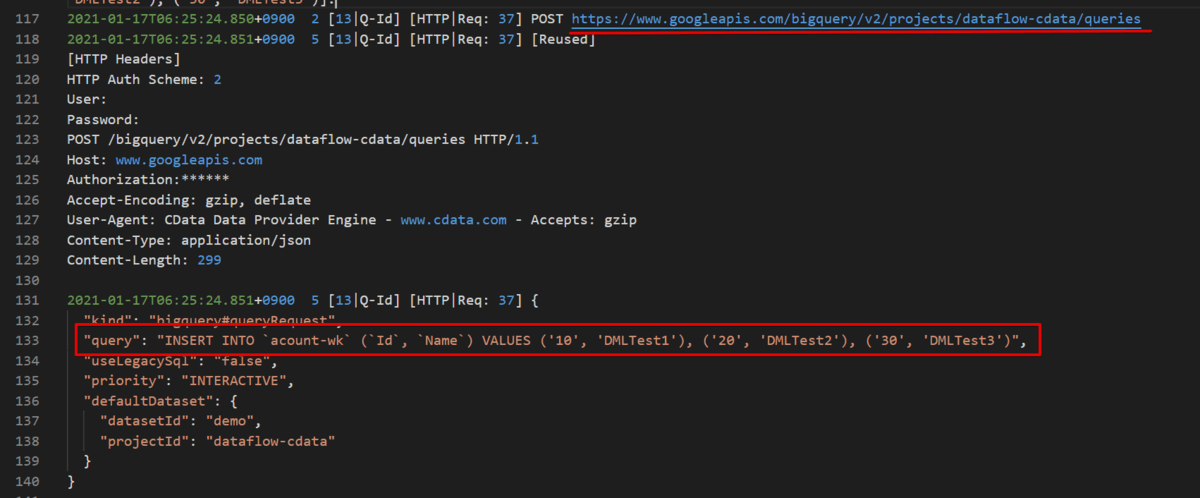
This time, instead of calling the queries method and setting the record in JSON, you send it directly as an INSERT statement.
For Bulk Loading
Connect with InsertStrategy=batch in the connection string and run the following SQL query:
INSERT INTO [account-wk] (Id, Name) VALUES
(10, 'BulkTest1'),
(20, 'BulkTest2'),
(30, 'BulkTest3');
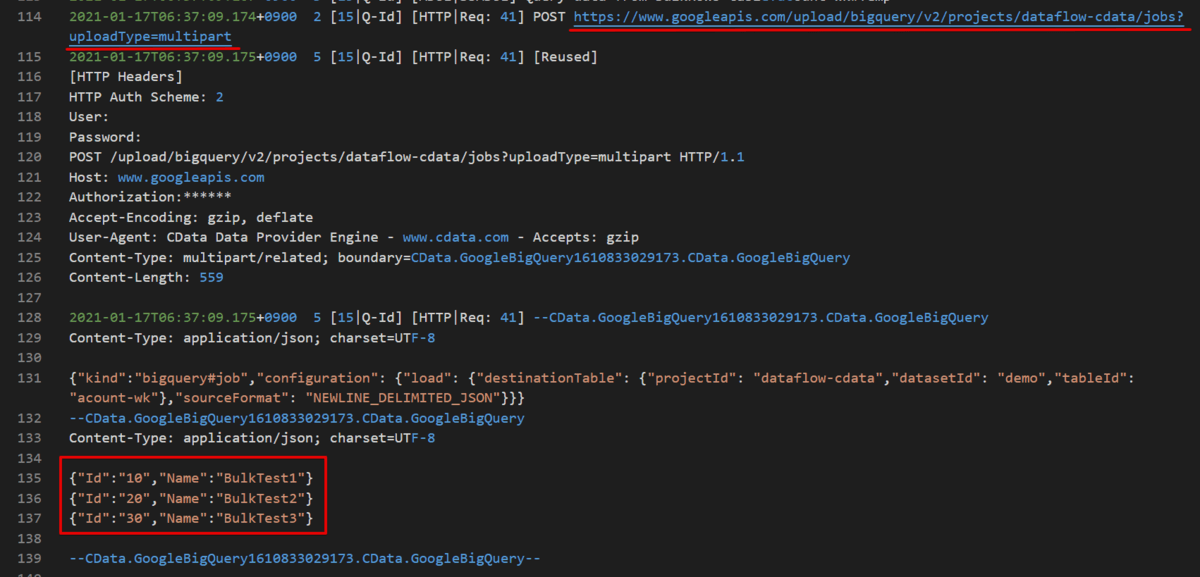
In the logs, you can see that the API upload is triggered. While it may not be obvious with a small amount of data, all records are sent together in a single request.
Performance Comparison
We used the following 10 columns of data for the test, measuring performance for 100, 500, 5000, and 10000 rows, respectively.
An example insert statement:
INSERT INTO customer_data (id, first_name, last_name, email, phone, address, city, state, zip, country) VALUES
    (9999, 'John', 'Doe', '[email protected]', '555-1234', '123 Elm St', 'Somewhere', 'CA', '90210', 'USA');
Here are the results for each insert method using the CData BigQuery JDBC Driver:
| Insert Method | 100 Rows | 500 Rows | 5,000 Rows | 10,000 Rows |
|---|---|---|---|---|
| Streaming | 0.491 sec | 1.162 sec | 8.928 sec | 13.788 sec |
| DML | 1.617 sec | 2.482 sec | 3.312 sec | 3.852 sec |
| Bulk | 1.447 sec | 1.405 sec | 1.751 sec | 2.801 sec |
Insights
- Streaming Inserts: Fastest for smaller batches (100-500 rows). For larger batches, multiple API requests are required, which increases the overall time.
- Bulk Loading: Provides consistently stable performance, making it ideal for large batch sizes and multiple inserts (over 500 inserts).
- DML: Performed better than expected for this test size, but performance differences may be better seen with larger record sizes.
Conclusion: Choose Your Method
Whether you need real-time data availability, transactional integrity, or cost-efficient large data loads, the CData BigQuery Driver supports all three insert methods: Streaming, DML, and Bulk Loading. Each method has its strengths, depending on your use case.
Get started with the CData BigQuery Driver and choose the right method for your data workflows:
