
Model Context Protocol (MCP) finally gives AI models a way to access the business data needed to make them really useful at work. CData MCP Servers have the depth and performance to make sure AI has access to all of the answers.
Try them now for free →


Start Visualizing Facebook Ads Performance Using CData
Facebook Ads dashboards are useful, but often filled with an overwhelming assortment of charts, graphs, and raw numbers. In digital marketing, running campaigns is only part of the job. Understanding the results is just as important. Visualization helps turn raw metrics into meaningful insights, showing what is performing well, what needs attention, and how to optimize budget allocation.
CData Facebook Ads drivers and connectors simplify this process by allowing you to bring ad data into tools like Power BI, Tableau, Excel, and more! In this article, we explore why visualizing Facebook Ads data is crucial across various industries, along with a practical example of connecting it to Power BI to create an interactive, campaign-focused dashboard.
Why visualization matters for Facebook Ads
Facebook Ads generate a wide array of performance metrics: impressions, clicks, conversions, cost per acquisition, return on ad spend (ROAS), and more. Raw numbers can be overwhelming. Visualization transforms these metrics into understandable, actionable insights.
With the right visual tools, you can:
- Spot underperforming campaigns quickly
- Identify trends over time
- Compare demographics and placements
- Showcase ROI to stakeholders
Where and when to use CData drivers and connectors
With the help of CData Facebook Ads drivers and connectors, you can drop your ad data into virtually any analytics, integration, or automation workflow you already use. Below is a quick guide to each CData driver/connector/technology, the industries that lean on them most, and where you can use them to extract maximum value.
| Connector / Technology | Typical Endpoints | Live vs. Cached | Ideal For | Sample Industry Use Case |
|---|---|---|---|---|
| ODBC & JDBC Drivers | Tableau, Power BI, Qlik, Looker, custom apps | Live or cached | Interactive dashboards, ad-hoc queries | Retail & eCommerce – Merchandising teams join Facebook Ads spend with Shopify data in Power BI to track ROAS in near real-time. |
| ADO.NET Provider | .NET apps, SSRS, ASP.NET | Live or cached | Embedded, pixel-perfect reports | Financial Services – Internal portals display ad performance securely for compliance and executive reviews. |
| Power BI Connector | Power BI Desktop & Service (Import or DirectQuery) | Live or cached | Self-service BI in Microsoft environments | SaaS & Tech – Growth teams analyze lead-gen performance by blending ad data with Azure SQL and product usage. |
| Tableau Connector | Tableau Desktop, Server & Cloud | Live or extract | Visual storytelling, stakeholder insights | Media & Entertainment – Ops teams visualize creative performance across platforms like Reels and Facebook Video. |
| Excel Add-in & Google Sheets | Excel (Win/Mac), Google Sheets | Cached with refresh | Lightweight analysis and collaboration | Non-profit & Education – Budget owners validate ad spend weekly using pivots and charts in spreadsheets. |
| SSIS Components | SQL Server Integration Services jobs | Bulk load | Data warehousing and ELT pipelines | Enterprise Retail – Facebook Ads data is landed nightly into Snowflake to correlate with POS and inventory systems. |
| Python & R Libraries | Jupyter, Airflow, Databricks | Live or cached | Forecasting, machine learning workflows | Travel & Hospitality – Data scientists model booking behavior using historical ads and conversions. |
| PowerShell Cmdlets | Windows Task Scheduler, Azure Functions | Live | Scripting and automation | B2B SaaS – Ops teams automate daily exports of ad metrics to partners via SFTP. |
How do the CData drivers work
- Secure authentication: Once the user's Facebook Ads account is connected using the Account ID and access credentials, the driver securely authenticates requests to the Facebook Marketing API using this information.
- Schema discovery: Facebook Ads entities like ‘Custom Audiences’ and ‘Custom Conversions’ are exposed as queryable virtual tables, enabling intuitive SQL-based data access.
- Query pushdown: SQL filters and supported aggregations are translated into Facebook Marketing API queries, minimizing unnecessary data transfer and improving performance.
- Caching & incremental sync: Optional local caching and support for incremental loading help accelerate dashboards while conserving API quota usage.
Best Tools for Facebook Ads Visualization (Using CData Drivers and Connectors)
The following tools/platforms are commonly used with CData drivers & connectors to visualize Facebook Ads data:
Power BI
The CData Power BI Connector or ODBC Driver helps users connect Facebook Ads data directly into Power BI using either DirectQuery or Import mode. This setup supports rich, real-time insights and customizable dashboards tailored to campaign performance and business KPIs. Users can:
- Build interactive dashboards with filters for campaigns, dates, and devices
- Create DAX-powered KPI summaries
- Integrate with CRM or sales data
Tableau
CData enables users to connect Facebook Ads data to Tableau using the JDBC Driver or Tableau Connector for Facebook Ads. This setup supports efficient data preparation, visual analysis of campaign performance, and clear reporting for stakeholders. They can:
- Use Tableau Prep to clean and join datasets
- Create funnel visualizations or track ROAS over time
- Build stakeholder-ready executive dashboards
Microsoft Excel or Google Sheets
CData provides connectors for both Excel (Add-in) and Google Sheets, allowing users to access Facebook Ads data directly within spreadsheet environments. This setup is ideal for quick analysis, reporting, and collaboration without requiring advanced technical skills. Users can:
- Pull ad performance data into familiar environments
- Generate pivot tables and charts quickly
- Collaborate with non-technical users
Access live Facebook Ads data in Power BI Desktop
As an example, let’s walk through how to use the Facebook Ads Power BI connector in Power BI Desktop to import and visualize ad performance data. You can query Facebook Ads data from Power BI in four simple steps (for a full tutorial, check out this Knowledge Base article):
- Install the Power BI connector: Install the Facebook Ads Power BI Connector on the machine running Power BI Desktop. You can download a free 30-day trial of the Power BI connector.
- Connect to Facebook Ads: Open the ODBC Administrator (make sure it matches the bitness of your Power BI installation: 32-bit or 64-bit). Then, configure or create a new DSN using the installed Facebook Ads connector. Enter the Facebook Account ID under Basic connection properties and click Test Connection to verify connectivity with your Facebook Ads account. Once successful, click OK to save the DSN configuration.
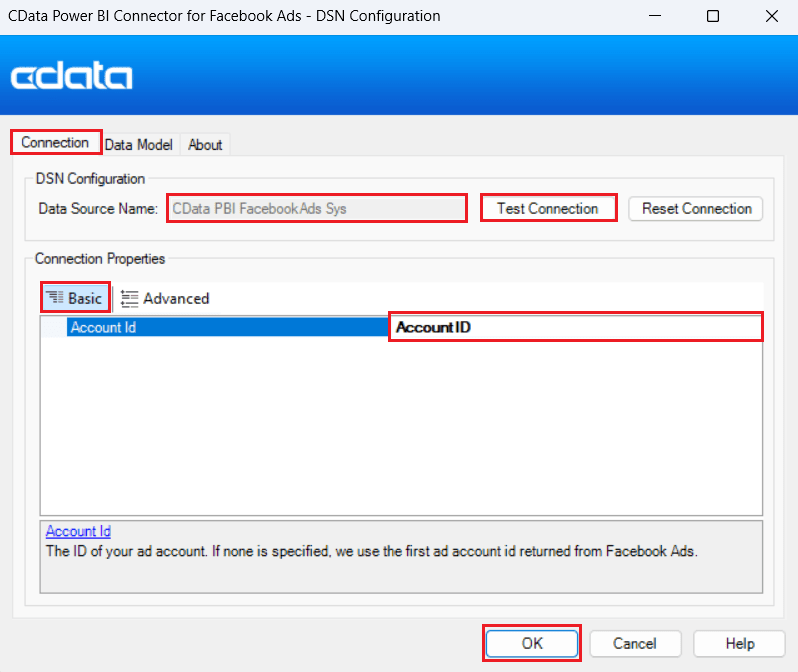
Note: To understand more about the Facebook Ads connector, you can refer to our Facebook Ads Driver Documentation.
- Open Facebook Ads connection in Power BI: Launch Power BI Desktop, click Get Data, and search for CData Facebook Ads under the "All" option. Select it and click Connect.
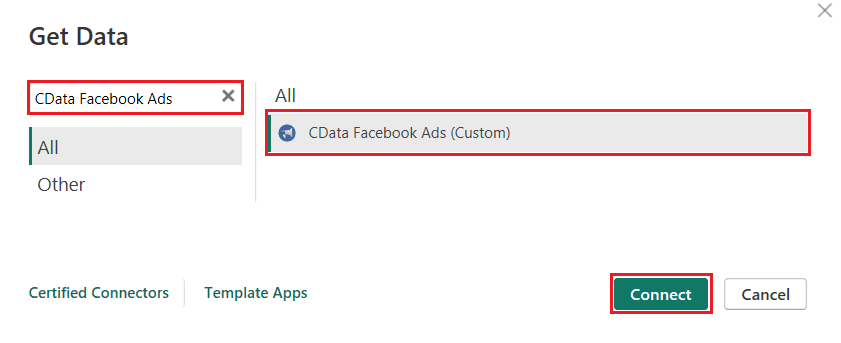
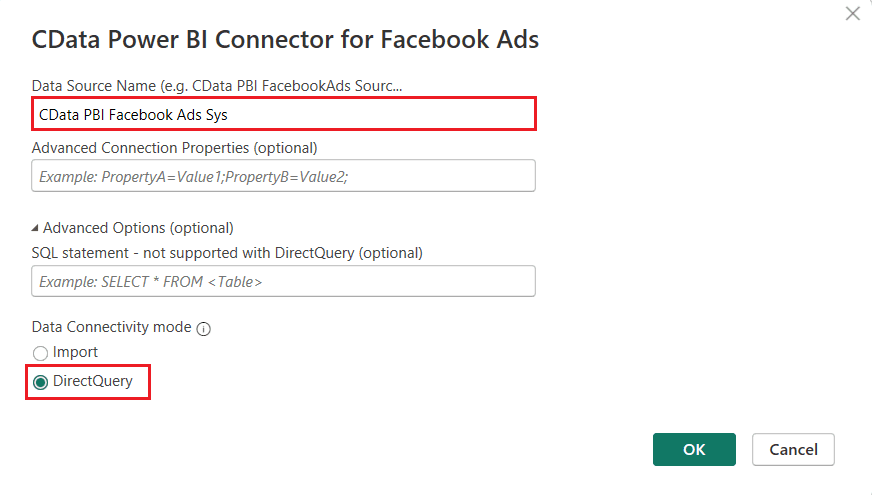
When prompted, enter the DSN name you configured in the previous step.
Choose your preferred Data Connectivity mode (Import or DirectQuery), and then select the tables or views, such as Conversions, Audiences, Campaigns, or Ads, that you want to work with from the Navigator window.
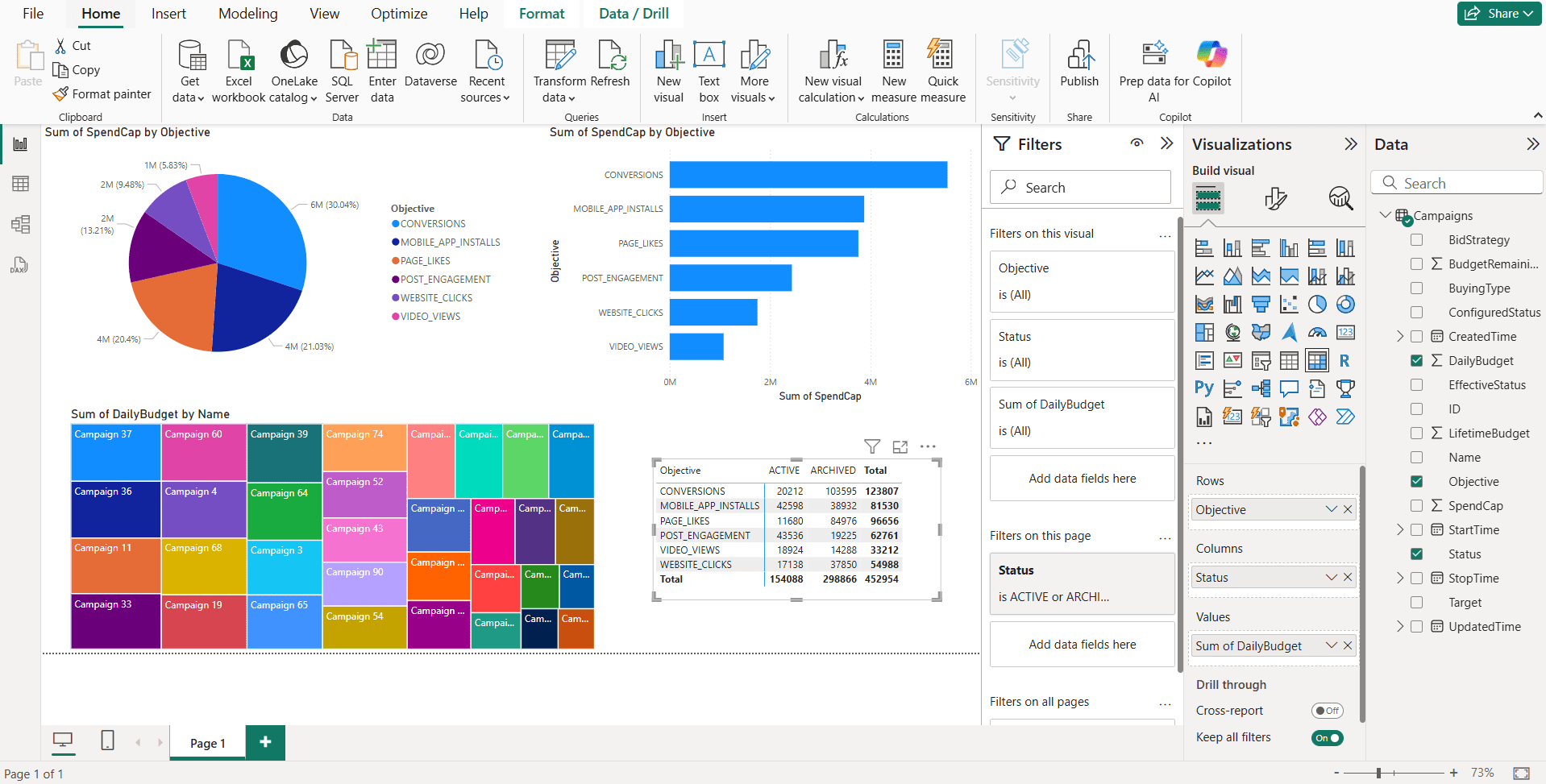
- Visualize Facebook Ads data in Power BI: Once your data is loaded into Power BI, you can start building visualizations in the Report View. These visuals can include charts and summaries based on key ad performance metrics such as impressions, clicks, conversions, and spend.
The dashboard below shows ‘Spend Capital’ by objective (pie and bar charts), ‘Daily Budget’ by campaign name (treemap), and a matrix of ‘Daily Budget’ by objective and status for a clear view of budget distribution.
Simplified Facebook Ads connectivity with CData
The CData Facebook Ads drivers and connectors help marketers and analysts take control of their ad data and unlock valuable insights through visualization. Whether you're just starting out or scaling to enterprise-level reporting, CData provides flexibility, live access, and compatibility with leading tools in the analytics ecosystem.
Ready to get started? Download a free 30-day trial of any of our 270+ drivers and connectors today. As always, our world-class Support Team is available to help with any questions you may have.
