
Model Context Protocol (MCP) finally gives AI models a way to access the business data needed to make them really useful at work. CData MCP Servers have the depth and performance to make sure AI has access to all of the answers.
Try them now for free →


CData Sync Enhances Snowflake Integration with Optimized High Volume Data Handling
Snowflake, a leading cloud data platform, is known for its scalability, performance, and ability to handle diverse data workloads across the enterprise. As organizations increasingly rely on Snowflake for their analytics and data warehousing needs, the demand for efficient, high-volume data integration continues to grow.
CData Sync offers seamless, no-code data replication from hundreds of data sources directly into Snowflake. With the release of CData Sync V24.3, performance has taken a major leap forward. The latest version delivers significantly faster processing speeds when replicating large datasets into Snowflake. In fact, for all jobs using the optimized method, the completion time has been cut nearly in half. In this article, we’ll explore further into the enhancements made to the processing engine and share performance comparisons across data volumes of 1 million, 2 million, 3 million, and 10 million records.
Conventional replication method
When replicating large volumes of data to Snowflake, the conventional method introduces several performance challenges. Excessive processing during data transfer—especially during the COPY INTO step—slows down replication. Additionally, because the system stores all data in memory, it often triggers Out of Memory (OOM) errors depending on the environment. These issues make the replication process inefficient and risky for large datasets.
Conventional processing workflow
Here’s how the conventional replication method typically works in the background when a job is run in CData Sync:
- CData Sync creates a temporary table in Snowflake.
- It then creates an internal stage in Snowflake.
- Following that, it splits all records into multiple files and uploads them to the internal stage.
- It loads each batch of data into the primary table using the COPY INTO command. Here, steps 3 and 4 form one set, which the system repeats until it transfers all records.
- Finally, it merges the temporary table with the target table.
This approach triggers multiple PUT requests, repeated file operations, and consumes significant memory, making it unsuitable for high-volume replication.
Optimized method in CData Sync V24.3 (and above)
With version 24.3, CData Sync introduced a faster and more memory-efficient replication method. The new process reduces the number of file outputs, file stream reads, PUT requests, and COPY INTO operations, significantly lowering the risk of OOM errors and boosting performance.
New processing workflow
Here’s how the new method works:
- CData Sync creates a temporary table in Snowflake.
- It creates an internal stage in Snowflake.
- It outputs all records to a single local file.
- It reads the file using a stream and uploads the content to the internal stage.
- It loads the data into the primary table using the COPY INTO command. Here, steps 3 to 5 form one set, which the system repeats until it transfers all records.
- Finally, it merges the temporary table with the target table.
By eliminating unnecessary file splits and optimizing how it uploads and loads data, CData Sync V24.3 handles high-volume replication with far greater speed and reliability.
Switch to the latest version of CData Sync
First, update CData Sync to version 24.3 (latest version) and switch the Snowflake connector to the V24 connector. (Note: Sync versions 24.2 and earlier use the V23 connector.)
After completing the update, configure the job settings. Open the replication job targeting Snowflake and, under the Advanced tab in the task, edit the Replicate Options, and set the following property in the Additional Options section:
RowTransferType=CopyInto
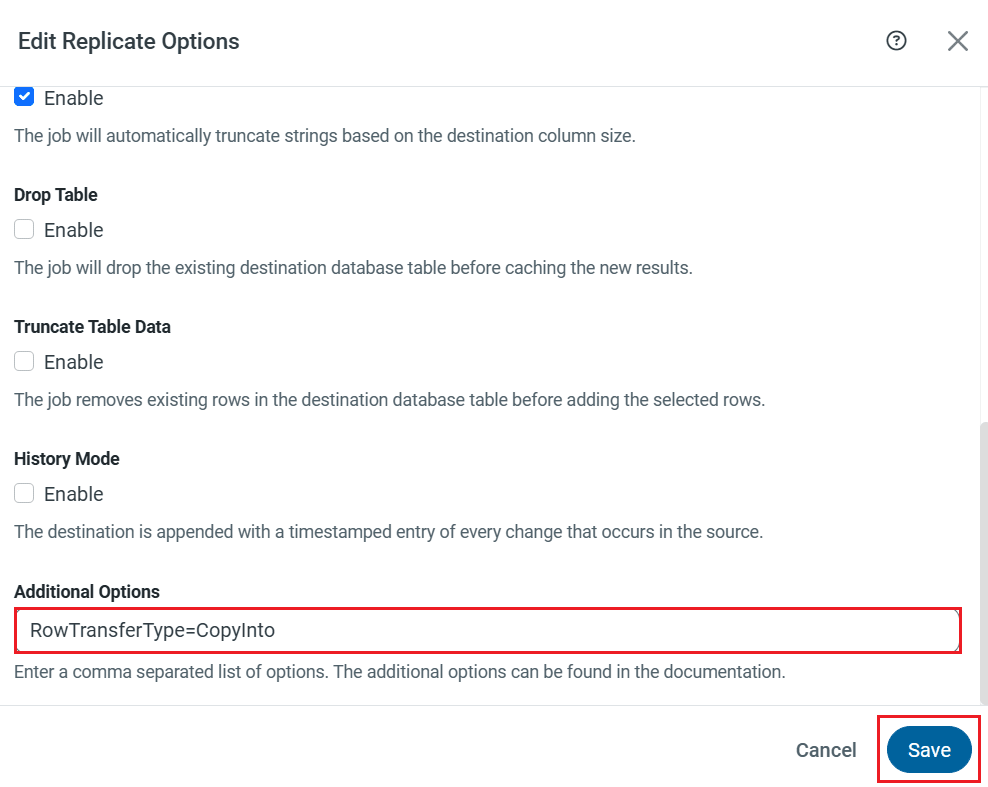
Save the Replicate Options, and the setup is complete.
Performance comparison: conventional method vs. optimized method
To measure the performance impact of the additional option RowTransferType=CopyInto, we created a test table with 10 columns and datasets containing 2 million and 3 million rows, as well as a table with 20 columns and datasets containing 10 million and 100 million rows. We then compared replication performance with and without the option enabled.
We recorded the job completion times displayed by CData Sync to assess the performance differences.
| Method | 1 Million | 2 Million | 3 Million | 10 Million |
|---|---|---|---|---|
| Conventional (Old) | 2 minutes 29 seconds | 4 minutes 33 seconds | 5 minutes 5 seconds | 23 minutes 20 seconds |
| Optimized (New) | 1 minute 28 seconds | 1 minute 42 seconds | 2 minutes 28 seconds | 12 minutes 20 seconds |
Test Environment
- CData Sync hosting specs: 32 GB RAM, Intel Core i5-1135G7, 4 cores, 8 threads
- Snowflake configuration: Warehouse size – XS
As you can see from the table above, the replication job completed significantly faster with this option enabled!
Conclusion
By enabling the newly introduced RowTransferType option, CData Sync significantly improves data replication performance to Snowflake. We plan to extend similar performance enhancements to other cloud data warehouses such as BigQuery, Redshift, and more, so stay tuned for future updates.
CData Sync offers a 30-day free trial, giving you the opportunity to explore its powerful data integration capabilities firsthand. Start consolidating your enterprise data into a cloud data warehouse today. As always, our world-class Support Team is available to assist you with any questions you may have!
