
Model Context Protocol (MCP) finally gives AI models a way to access the business data needed to make them really useful at work. CData MCP Servers have the depth and performance to make sure AI has access to all of the answers.
Try them now for free →


DataBind HDFS Data to the DevExpress Data Grid
Use the CData ADO.NET Provider for HDFS with the DevExpress Windows Forms and Web controls to provide HDFS data to a chart.
The ADO.NET Provider for HDFS by CData incorporates conventional ADO.NET data access components compatible with third-party controls. You can adhere to the standard ADO.NET data binding procedures to establish two-way access to real-time data through UI controls. This article will demonstrate the utilization of CData components for data binding with DevExpress UI Controls (Windows Forms and Web controls), specifically binding to a chart that visualizes live data.
In order to authenticate, set the following connection properties:
- Host: Set this value to the host of your HDFS installation.
- Port: Set this value to the port of your HDFS installation. Default port: 50070
Windows Forms Controls
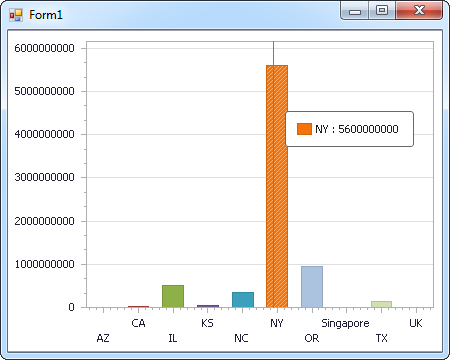
The code below shows how to populate a DevExpress chart with HDFS data. The HDFSDataAdapter binds to the Series property of the chart control. The Diagram property of the control defines the x- and y-axes as the column names.
using (HDFSConnection connection = new HDFSConnection(
"Host=sandbox-hdp.hortonworks.com;Port=50070;Path=/user/root;User=root;")) {
  HDFSDataAdapter dataAdapter = new HDFSDataAdapter(
  "SELECT FileId, ChildrenNum FROM Files WHERE FileId = '119116'", connection);

  DataTable table = new DataTable();
  dataAdapter.Fill(table);
  DevExpress.XtraCharts.Series series = new DevExpress.XtraCharts.Series();
  chartControl1.Series.Add(series);
  series.DataSource = table;
  series.ValueDataMembers.AddRange(new string[] { "ChildrenNum" });
  series.ArgumentScaleType = DevExpress.XtraCharts.ScaleType.Qualitative;
  series.ArgumentDataMember = "FileId";
  series.ValueScaleType = DevExpress.XtraCharts.ScaleType.Numerical;
  chartControl1.Legend.Visibility = DevExpress.Utils.DefaultBoolean.False;
  ((DevExpress.XtraCharts.SideBySideBarSeriesView)series.View).ColorEach = true;
}
Web Controls
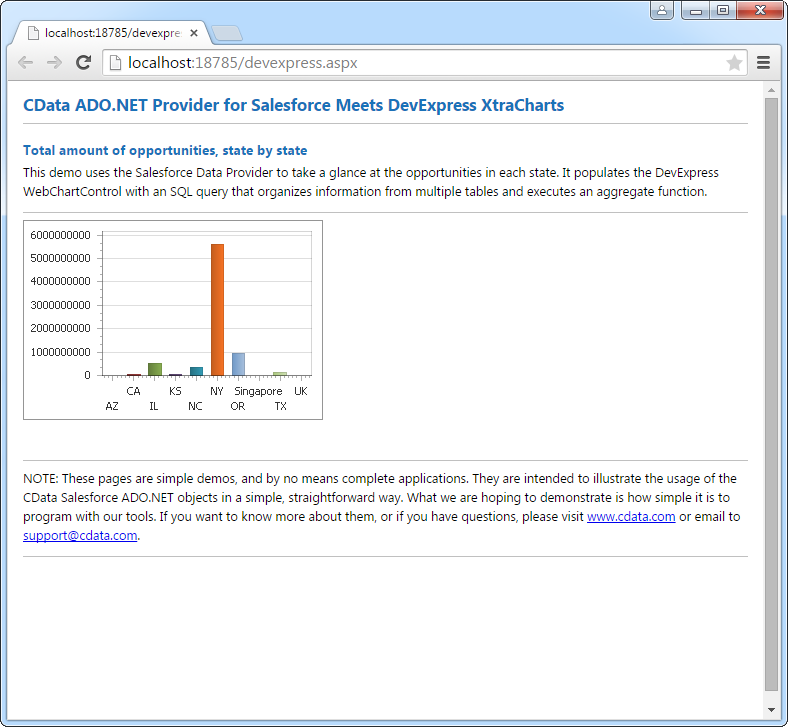
The code below shows how to populate a DevExpress Web control with HDFS data. The HDFSDataAdapter binds to the Series property of the chart; the Diagram property defines the x- and y-axes as the column names.
using DevExpress.XtraCharts;

using (HDFSConnection connection = new HDFSConnection(
"Host=sandbox-hdp.hortonworks.com;Port=50070;Path=/user/root;User=root;"))
{
  HDFSDataAdapter HDFSDataAdapter1 = new HDFSDataAdapter("SELECT FileId, ChildrenNum FROM Files WHERE FileId = '119116'", connection);
  DataTable table = new DataTable();
  HDFSDataAdapter1.Fill(table);
  DevExpress.XtraCharts.Series series = new Series("Series1", ViewType.Bar);
  WebChartControl1.Series.Add(series);
  series.DataSource = table;
  series.ValueDataMembers.AddRange(new string[] { "ChildrenNum" });
  series.ArgumentScaleType = ScaleType.Qualitative;
  series.ArgumentDataMember = "FileId";
  series.ValueScaleType = ScaleType.Numerical;
  ((DevExpress.XtraCharts.SideBySideBarSeriesView)series.View).ColorEach = true;
}
Ready to get started?
Download a free trial of the HDFS Data Provider to get started:
Download NowLearn more:
 HDFS ADO.NET Provider
Rapidly create and deploy powerful .NET applications that integrate with HDFS.
