
Model Context Protocol (MCP) finally gives AI models a way to access the business data needed to make them really useful at work. CData MCP Servers have the depth and performance to make sure AI has access to all of the answers.
Try them now for free →


Use JayDeBeApi to access Salesforce Data Cloud Data in Python
Use standard Python scripting and the development environment of your choice to access live Salesforce Data Cloud data.
Access Salesforce Data Cloud data with Python scripts and standard SQL on any machine where Python and Java can be installed. You can use the CData JDBC Driver for Salesforce Data Cloud and the JayDeBeApi module to work with remote Salesforce Data Cloud data in Python. By using the CData Driver, you are leveraging a driver written for industry-proven standards to access your data in the popular Python language. This article shows how to use the driver to execute SQL queries to Salesforce Data Cloud and visualize Salesforce Data Cloud data with standard Python.
Use the JayDeBeApi module
JayDeBeApi is a Python library that serves as a JDBC (Java Database Connectivity) bridge, allowing Python programs to interact with Java databases, including CData JDBC Drivers. Use the pip install command to install the module:
pip install JayDeBeApi
Create the JDBC URL
Once you have JayDeBeApi installed, you are ready to work with Salesforce Data Cloud data in Python using SQL.
Salesforce Data Cloud supports authentication via the OAuth standard.
OAuth
Set AuthScheme to OAuth.
Desktop Applications
CData provides an embedded OAuth application that simplifies authentication at the desktop.
You can also authenticate from the desktop via a custom OAuth application, which you configure and register at the Salesforce Data Cloud console. For further information, see Creating a Custom OAuth App in the Help documentation.
Before you connect, set these properties:
- InitiateOAuth: GETANDREFRESH. You can use InitiateOAuth to avoid repeating the OAuth exchange and manually setting the OAuthAccessToken.
- OAuthClientId (custom applications only): The Client ID assigned when you registered your custom OAuth application.
- OAuthClientSecret (custom applications only): The Client Secret assigned when you registered your custom OAuth application.
When you connect, the driver opens Salesforce Data Cloud's OAuth endpoint in your default browser. Log in and grant permissions to the application.
The driver then completes the OAuth process as follows:
- Extracts the access token from the callback URL.
- Obtains a new access token when the old one expires.
- Saves OAuth values in OAuthSettingsLocation so that they persist across connections.
For other OAuth methods, including Web Applications and Headless Machines, refer to the Help documentation.
Built-in Connection String Designer
For assistance in constructing the JDBC URL, use the connection string designer built into the Salesforce Data Cloud JDBC Driver. Either double-click the JAR file or execute the jar file from the command-line.
java -jar cdata.jdbc.salesforcedatacloud.jar
Fill in the connection properties and copy the connection string to the clipboard.
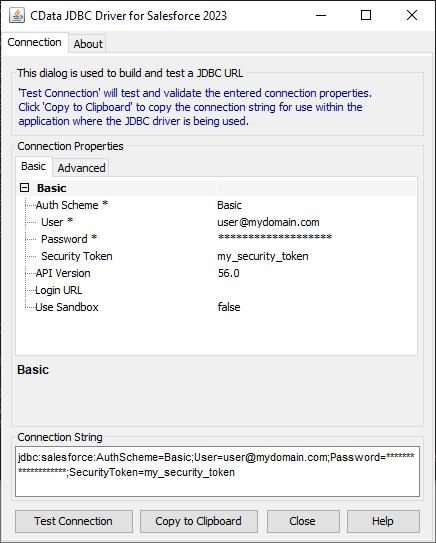
Below is a sample variable assignment, including a typical JDBC connection string:
jdbc_url = "jdbc:salesforcedatacloud:InitiateOAuth=GETANDREFRESH"
Access Salesforce Data Cloud data in Python
With the JDBC URL configured, you only need the absolute path to the JDBC driver JAR file, which is in the "lib" folder in the installation directory ("C:\Program Files\CData[product_name] 20XX\lib\cdata.jdbc.salesforcedatacloud.jar" on Windows).
NOTE: If you haven't already, set the JAVA_HOME environment variable to the Java installation directory.
Use code similar to the follow to read and print data from Salesforce Data Cloud:
import jaydebeapi

#The JDBC connection string
jdbc_url = "jdbc:salesforcedatacloud:InitiateOAuth=GETANDREFRESH"

username = "****"
password = "****"

#The absolute Path to the JDBC driver JAR file, typically:
jdbc_driver_jar = "C:\Program Files\CData[product_name] 20XX\lib\cdata.jdbc.salesforcedatacloud.jar"

conn = jaydebeapi.connect(
   "cdata.jdbc.salesforcedatacloud.SalesforceDataCloudDriver",
   jdbc_url,
   [username, password],
   jdbc_driver_jar,
)

cursor = conn.cursor()
cursor.execute("SELECT * FROM Account;")


results = cursor.fetchall()
for row in results:
    print(row)

cursor.close()
conn.close()
Free trial & more information
Download a free, 30-day trial of the CData JDBC Driver for Salesforce Data Cloud and start working with your live Salesforce Data Cloud data in Python. Reach out to our Support Team if you have any questions.
Ready to get started?
Download a free trial of the Salesforce Data Cloud Driver to get started:
Download NowLearn more:
 Salesforce Data Cloud JDBC Driver
Rapidly create and deploy powerful Java applications that integrate with Salesforce Data Cloud.
