
Model Context Protocol (MCP) finally gives AI models a way to access the business data needed to make them really useful at work. CData MCP Servers have the depth and performance to make sure AI has access to all of the answers.
Try them now for free →


How to connect to ServiceNow Data from IntelliJ
Integrate connectivity to ServiceNow data with wizards in IntelliJ.
The CData JDBC Driver for ServiceNow enables you to access ServiceNow as a JDBC data source, providing integration with rapid development tools in IDEs. This article shows how to use the data source configuration wizard to connect to ServiceNow data in IntelliJ.
About ServiceNow Data Integration
CData simplifies access and integration of live ServiceNow data. Our customers leverage CData connectivity to:
- Get optimized performance since CData uses the REST API for data and the SOAP API for schema.
- Read, write, update, and delete ServiceNow objects like Schedules, Timelines, Questions, Syslogs and more.
- Use SQL stored procedures for actions like adding items to a cart, submitting orders, and downloading attachments.
- Securely authenticate with ServiceNow, including basic (username and password), OKTA, ADFS, OneLogin, and PingFederate authentication schemes.
Many users access live ServiceNow data from preferred analytics tools like Tableau, Power BI, and Excel, and use CData solutions to integrate ServiceNow data with their database or data warehouse.
Getting Started
Create a JBDC Data Source for ServiceNow
Follow the steps below to add the driver JAR and define connection properties required to connect to ServiceNow data.
- In the Data Sources window, right-click and then click Add Data Source -> DB Data Source.
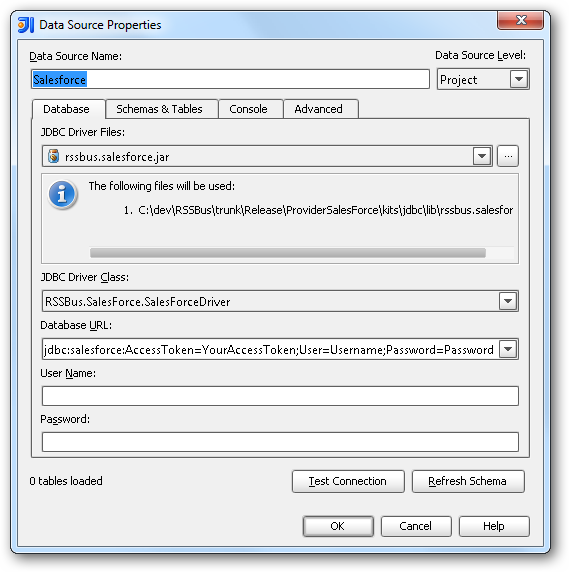
In the Data Source Properties dialog that appears, the following properties are required:
- JDBC Driver Files: Click the button next to this menu to add the JDBC Driver file cdata.jdbc.servicenow.jar, located in the installation directory.
- JDBC Driver Class: In this menu, select cdata.jdbc.servicenow.ServiceNowDriver from the list.
Database URL: Enter the connection URL in the JDBC URL property. The URL must start with jdbc:servicenow: and includes connection properties separated with semicolons.
ServiceNow uses the OAuth 2.0 authentication standard. To authenticate using OAuth, register an OAuth app with ServiceNow to obtain the OAuthClientId and OAuthClientSecret connection properties. In addition to the OAuth values, specify the Instance, Username, and Password connection properties.
See the "Getting Started" chapter in the help documentation for a guide on connecting to ServiceNow.
Built-in Connection String Designer
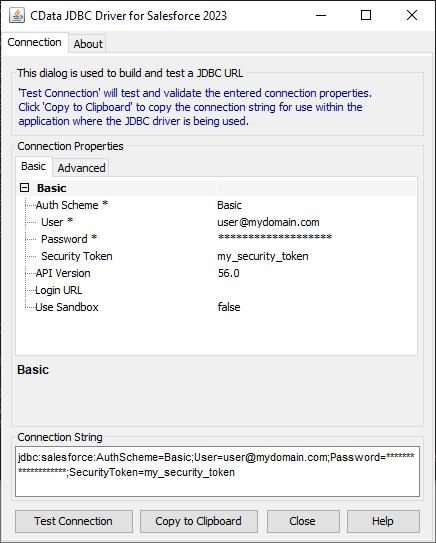
For assistance in constructing the JDBC URL, use the connection string designer built into the ServiceNow JDBC Driver. Either double-click the JAR file or execute the jar file from the command-line.
java -jar cdata.jdbc.servicenow.jar
Fill in the connection properties and copy the connection string to the clipboard.
A typical JDBC URL is the following:
jdbc:servicenow:OAuthClientId=MyOAuthClientId;OAuthClientSecret=MyOAuthClientSecret;Username=MyUsername;Password=MyPassword;URL=https://myinstance12345.service-now-com;InitiateOAuth=GETANDREFRESH
Edit and Save ServiceNow Data
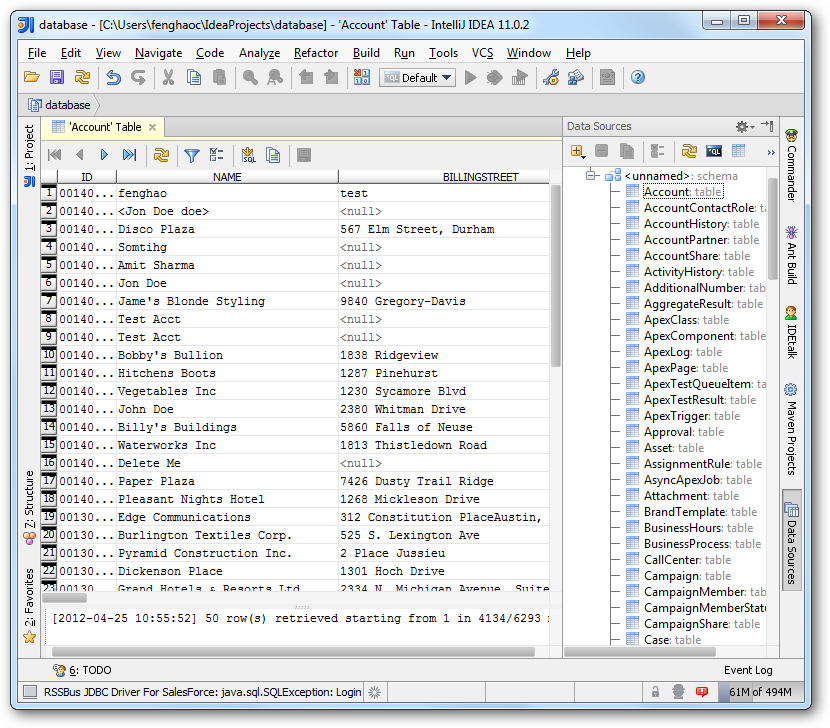
To discover schema information, right-click the data source you just created and click Refresh Tables. To query a table, right-click it and then click Open Tables Editor.
Ready to get started?
Download a free trial of the ServiceNow Driver to get started:
Download NowLearn more:
 ServiceNow JDBC Driver
Rapidly create and deploy powerful Java applications that integrate with ServiceNow data includingSchedules, Timelines, Questions, Syslogs, and more!
