DataBind WooCommerce Data to the DevExpress Data Grid
The ADO.NET Provider for WooCommerce by CData incorporates conventional ADO.NET data access components compatible with third-party controls. You can adhere to the standard ADO.NET data binding procedures to establish two-way access to real-time data through UI controls. This article will demonstrate the utilization of CData components for data binding with DevExpress UI Controls (Windows Forms and Web controls), specifically binding to a chart that visualizes live data.
WooCommerce supports the following authentication methods: one-legged OAuth1.0 Authentication and standard OAuth2.0 Authentication.
Connecting using one-legged OAuth 1.0 Authentication
Specify the following properties (NOTE: the below credentials are generated from WooCommerce settings page and should not be confused with the credentials generated by using WordPress OAuth2.0 plugin):
- ConsumerKey
- ConsumerSecret
Connecting using WordPress OAuth 2.0 Authentication
After having configured the [ plugin, you may connect to WooCommerce by providing the following connection properties:
]
- OAuthClientId
- OAuthClientSecret
- CallbackURL
- InitiateOAuth - Set this to either GETANDREFRESH or REFRESH
In either case, set the Url property to the URL of the WooCommerce instance.
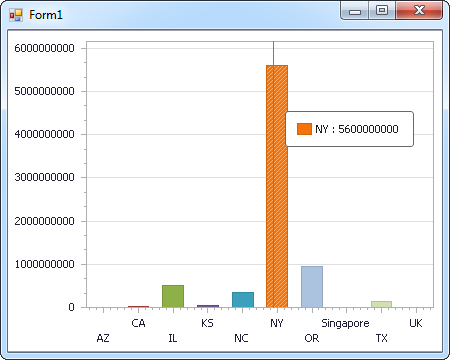
The code below shows how to populate a DevExpress chart with WooCommerce data. The WooCommerceDataAdapter binds to the Series property of the chart control. The Diagram property of the control defines the x- and y-axes as the column names.
using (WooCommerceConnection connection = new WooCommerceConnection(
"Url=https://example.com/; ConsumerKey=ck_ec52c76185c088ecaa3145287c8acba55a6f59ad; ConsumerSecret=cs_9fde14bf57126156701a7563fc87575713c355e5; InitiateOAuth=GETANDREFRESH")) {
  WooCommerceDataAdapter dataAdapter = new WooCommerceDataAdapter(
  "SELECT ParentId, Total FROM Orders WHERE ParentId = '3'", connection);

  DataTable table = new DataTable();
  dataAdapter.Fill(table);
  DevExpress.XtraCharts.Series series = new DevExpress.XtraCharts.Series();
  chartControl1.Series.Add(series);
  series.DataSource = table;
  series.ValueDataMembers.AddRange(new string[] { "Total" });
  series.ArgumentScaleType = DevExpress.XtraCharts.ScaleType.Qualitative;
  series.ArgumentDataMember = "ParentId";
  series.ValueScaleType = DevExpress.XtraCharts.ScaleType.Numerical;
  chartControl1.Legend.Visibility = DevExpress.Utils.DefaultBoolean.False;
  ((DevExpress.XtraCharts.SideBySideBarSeriesView)series.View).ColorEach = true;
}
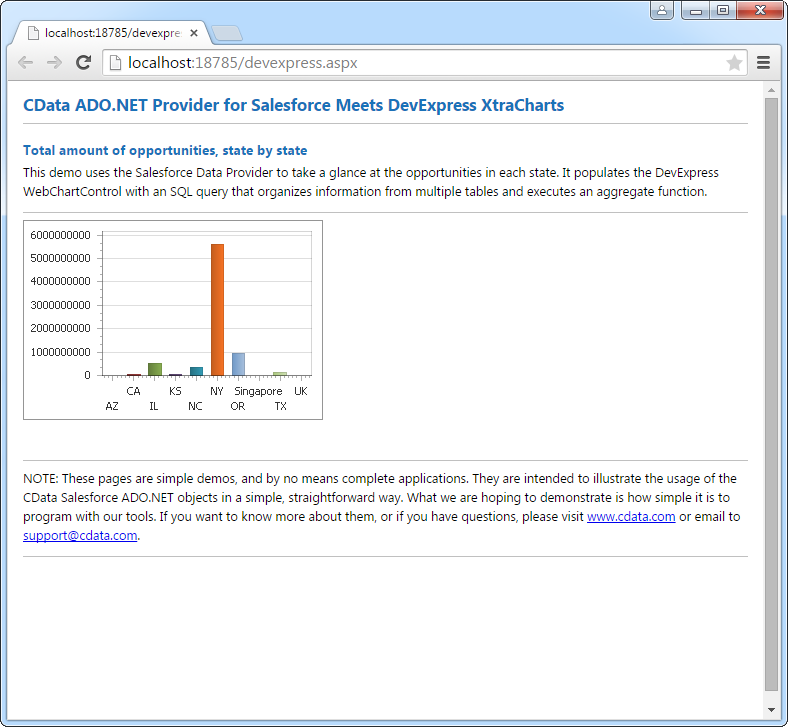
The code below shows how to populate a DevExpress Web control with WooCommerce data. The WooCommerceDataAdapter binds to the Series property of the chart; the Diagram property defines the x- and y-axes as the column names.
using DevExpress.XtraCharts;

using (WooCommerceConnection connection = new WooCommerceConnection(
"Url=https://example.com/; ConsumerKey=ck_ec52c76185c088ecaa3145287c8acba55a6f59ad; ConsumerSecret=cs_9fde14bf57126156701a7563fc87575713c355e5; InitiateOAuth=GETANDREFRESH"))
{
  WooCommerceDataAdapter WooCommerceDataAdapter1 = new WooCommerceDataAdapter("SELECT ParentId, Total FROM Orders WHERE ParentId = '3'", connection);
  DataTable table = new DataTable();
  WooCommerceDataAdapter1.Fill(table);
  DevExpress.XtraCharts.Series series = new Series("Series1", ViewType.Bar);
  WebChartControl1.Series.Add(series);
  series.DataSource = table;
  series.ValueDataMembers.AddRange(new string[] { "Total" });
  series.ArgumentScaleType = ScaleType.Qualitative;
  series.ArgumentDataMember = "ParentId";
  series.ValueScaleType = ScaleType.Numerical;
  ((DevExpress.XtraCharts.SideBySideBarSeriesView)series.View).ColorEach = true;
}




 WooCommerce ADO.NET Provider
