 How to accelerate data-driven application development with AI coding platforms and CData Code Assist MCP
The way developers build applications is changing. AI-powered coding tools such as Cursor, Claude Code, and GitHub Copilot are shifting software development from a line-by-line exercise into a collaborative workflow driven by intent and automation.
For data-driven applications, however, something critical has been missing. These applications depend on reliable access to Salesforce, Jira, SAP, databases, and hundreds of other enterprise systems. Until now, AI coding assistants have lacked direct visibility into the data models behind those systems, making it difficult to generate correct integration code.
CData Code Assist MCP closes this gap by enabling AI coding assistants to generate and validate application code that uses CData drivers and connectors from the start. With support for more than 350 enterprise and cloud data sources, developers can use AI tools to explore schemas, validate queries, and produce production-ready code that runs on CData JDBC Drivers, ADO.NET Providers, and Python Connectors.
This applies whether they are building BI queries, creating side-by-side SaaS applications, generating ETL pipelines, or embedding data connectivity into commercial software products.
Chatbots give advice: AI coding delivers results
Enterprises have spent years experimenting with conversational AI. Chatbots answer questions, summarize documents, and assist with research. The results are often inconsistent. Chatbots guess. They hallucinate. Ask the same question twice and the answer changes. There is no stabilization, no reproducibility, and no artifact that development teams can reliably build on.
More importantly, chatbots introduce a gap between insight and execution. A chatbot may explain how to query Salesforce data, but developers still need to write the code, test it, debug it, and deploy it elsewhere. The return on investment is difficult to measure because the output is advice rather than outcomes.

AI coding platforms operate differently. Their output is working code. Files that compile. Queries that execute. Applications that run against real systems using standard drivers and libraries.
From guessing to building with CData drivers and connectors
When an AI coding assistant generates a data access layer using CData drivers and connectors, the result is a tangible artifact. The code can be tested, versioned, and deployed. The distance between "what should I do" and "it works" is dramatically reduced.
Instead of copying examples from documentation or adapting suggestions from a chat window, developers collaborate with an AI that writes Java, .NET, or Python code directly into the codebase. The generated code uses the same drivers and connectors that will be deployed in production.
Stabilization through iteration
AI coding assistants operate on persistent files rather than ephemeral conversations. Developers can return to code generated weeks earlier and ask the AI to refine queries, add error handling, or extend functionality.
Because the code is built on CData drivers and connectors, each iteration improves real, validated integration logic. A Python ETL script generated last month can be extended to support new tables or filters without rewriting schema mappings or authentication logic. Progress accumulates rather than resets.
Measurable ROI for data integration
The value of AI coding in data-driven development is concrete. It shows up as time saved, fewer debugging cycles, and faster delivery.
When an AI coding assistant generates a Salesforce-to-MySQL integration using CData in minutes rather than hours, the impact is measurable. The output is not a suggestion. It is code that runs.
From guessing to knowing why AI coding assistants need MCP
AI coding assistants rely on documentation and generalized knowledge about APIs. They know that Salesforce includes objects such as Account and Opportunity. They do not know how your Salesforce org is configured.
Enterprise environments include custom objects, renamed fields, modified picklists, and validation rules unique to each business. Without live schema access, AI tools make incorrect assumptions. They reference fields that do not exist, filter on invalid values, and generate mappings that fail at runtime.
These issues surface late in the development cycle, after time has already been invested in writing and testing code.
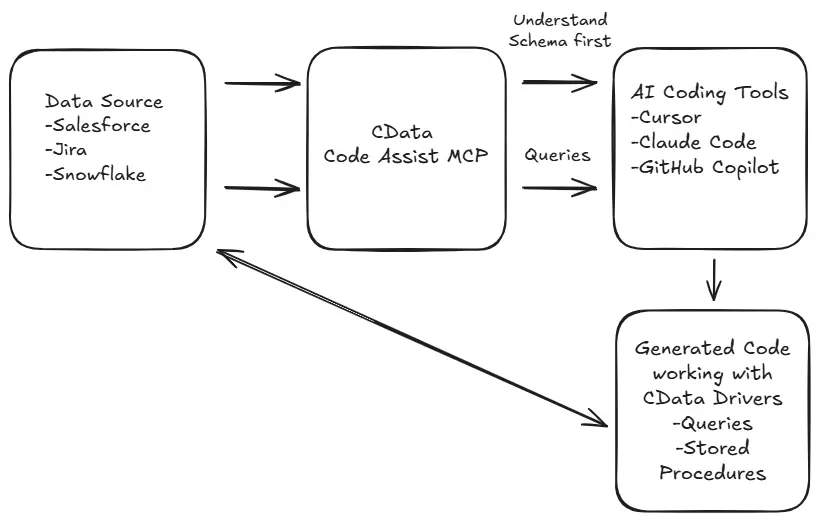
Model Context Protocol changes this dynamic. MCP gives AI coding assistants direct access to live metadata during development. The AI can inspect actual schemas through CData’s standardized model, validate SQL queries, and identify mismatches before code is generated.
CData Code Assist MCP applies MCP directly to CData connectors, so the AI works with the same schemas, tables, and columns that CData drivers expose at runtime. Code generation is based on reality rather than assumptions.
Context is everything—with schema from MCP, AI can code without errors
Building with AI vs. building AI
Using AI to accelerate application development is not the same as building AI applications.
AI applications embed machine learning models at runtime. Most enterprise developers, however, are building data-driven applications such as dashboards, ETL pipelines, internal tools, and SaaS integrations. These applications do not require AI in production. They require consistent, supported data connectivity.
CData Code Assist MCP is designed for this majority. AI is used during development to explore schemas, validate queries, and generate code. The final application runs on standard technologies such as Java with JDBC, Python with CData connectors, or C# with ADO.NET.
There are no MCP dependencies in production and no LLM calls at runtime. The deployed application relies entirely on CData drivers and connectors, with enterprise support and predictable behavior.
The CData advantage for AI-assisted development
CData Code Assist MCP is differentiated by the platform behind it.
Standardized abstraction with SQL
CData presents every supported data source through a consistent tabular model with SQL access. Salesforce, MongoDB, REST APIs, and traditional databases are all exposed using tables, columns, and SQL-92 syntax.
AI coding assistants already understand SQL. This allows them to generate queries, joins, and filters that work consistently across more than 350 data sources using the same CData drivers and connectors.
Intelligent query processing
CData optimizes query execution rather than simply translating SQL. Filters, joins, and aggregations are pushed down to the source where possible, leveraging native capabilities for performance.
AI-generated queries are not only syntactically correct; they are designed to execute efficiently through the driver layer.
Authentication handled centrally
OAuth flows, API keys, certificates, and SSO configurations are managed by CData. Authentication becomes configuration rather than custom code.
This removes one of the most common sources of failure in AI-generated integration code and ensures that what the AI generates can be deployed without rewriting security logic.
Resilience to API change
APIs evolve. Versions are deprecated. Authentication requirements change. Custom integration code accumulates technical debt.
CData absorbs these changes within the driver layer. Code Assist MCP queries live metadata, and CData drivers and connectors handle API versioning and protocol updates. Code generated today continues to work as underlying APIs evolve.
Full schema parity from development to production
The schema explored by an AI coding assistant through CData Code Assist MCP is identical to the schema exposed by CData drivers and connectors at runtime. Table names, column names, data types, and SQL syntax remain consistent.
Queries validated during development execute the same way in production BI tools, ETL pipelines, and applications. There is no translation step and no surprise behavior after deployment.
For ISVs accelerate your connectivity roadmap
Independent software vendors can embed CData to provide connectivity through standard JDBC or ADO.NET interfaces. Runtime integration is straightforward.
Delivering full value, however, requires more than drivers and connectors. It requires source-specific knowledge, validated examples, documentation, and support readiness across hundreds of systems.
CData Code Assist MCP accelerates this process. Engineering teams can use AI coding assistants to explore schemas through CData connectors, generate validated sample queries, and understand source-specific behavior. This knowledge feeds product design, documentation, templates, and support workflows.
The result is a more complete connectivity offering delivered faster, using the same drivers and connectors customers will run in production.
Get started building with AI and CData Drivers
CData Code Assist MCP works with the AI coding tools developers already use. Setup is straightforward. Install the MCP server, configure connections through the UI, and point the AI coding assistant to the generated configuration.
From there, development follows a predictable workflow:
Explore schemas and relationships exposed by CData connectors.
Prototype and validate SQL queries against real metadata.
Generate production code using CData JDBC Drivers, ADO.NET Providers, or Python Connectors
Deploy the same code with confidence in production environments.
AI coding assistants are only as effective as the context they receive. CData Code Assist MCP provides that context by exposing live schemas through CData’s standardized model and carrying those same abstractions into runtime execution through CData drivers.
Start building faster. Start building with confidence. Start building with free CData Code Assist MCP.
Explore CData Drivers and Connectors
Get blazing-fast access to live data with seamless connectivity from your data sources to the tools you use every day. Our standards-based connectors make data integration effortless – just point, click, and go.




